
Core blocks
| Block | Role |
|---|---|
| Bulk storage: chests for mixed goods, for one item per column. | |
| Merges adjacent Sophisticated Storage blocks into one shared inventory. | |
| Links many chests and barrels into one multiblock inventory (see Sophisticated Storage). | |
| Touches one inventory: a single block, a connector-merged column, or a Controller / IO block. Packs and unpacks addressed packages. | |
| Placed on a Packager: registers that inventory on the logistics network (chunk must stay loaded). | |
| Where you order items (Stock Keeper mob). Details. | |
| Linked by clicking a Stock Link. Recipe mode (brass, wall-mounted) monitors network-wide stock. Restocker mode (blue, on Packager) monitors that Packager’s inventory. | |
| Pulses requests to an address when a machine input runs low. | |
| Cardboard package + address | Routes deliveries through belts/chutes. Unpack at a Re-packager or destination . |
| , , | Mobile Packages: courier delivery to players or other ports on the same network. |
Build order below. Theory (packages, addresses, Stock Links, ticker UI): Logistics Network. SS block types and connectors: Sophisticated Storage.
Connecting storage to the network
Only inventories touched by a linked Packager appear on the Stock Ticker: but one Packager can represent many chests when storage is merged first. You do not need a Packager on every chest or barrel.
| Pattern | When to use | Packager placement |
|---|---|---|
| Direct | One-off chest or barrel you want requestable | Packager touches that block |
| Connector column | Vertical stack or adjacent blocks for one item type | merge the group. One Packager on the merged inventory |
| Controller hub | Whole storage room / many drawers | links blocks. One Packager on the Controller or Storage Input / Output / IO |
Step 1: Build your storage wall
Start with a dedicated storage room near your base center or machine hall.
- Place chests or in columns (see limited barrels for single-item columns).
- Choose how to link them: connectors per column for tight single-item stacks, or a central for the whole room (Controller setup).
- Plan an unpack zone nearby: belt or chute from a or Re-packager where addressed packages should open.
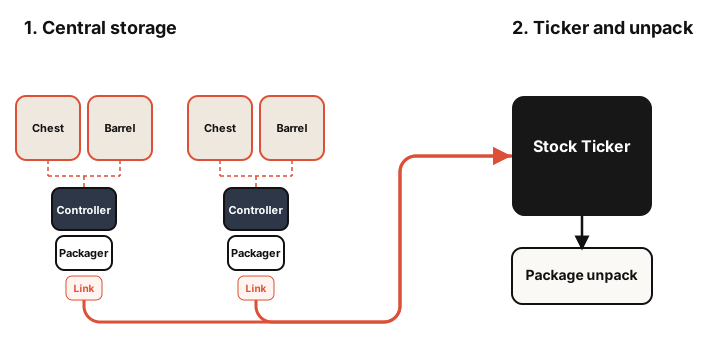
Tip: Limited barrels are ideal for single-item columns: one filter per Packager restocker gauge is easy to debug.
Step 2: Packagers and Stock Links
- Merge storage first: connectors on a column, or a with Storage Tool / Storage Links as needed.
- Place one against the inventory it should serve: a single block, a merged column, a Controller face, or a block on a Controller network.
- Place a on that Packager and join your network (Stock Links: chaining, range, chunk loading).
- Repeat only for separate inventories you want independently requestable (e.g. a workshop chest off to the side), not once per physical chest.
Step 3: Stock Ticker
- Place a near where you want to stand.
- Right-click a Stock Link while holding the ticker to join the network (Stock Ticker: keeper mob, addresses, UI).
- Seat a mob on a Seat (or blaze burner) behind the ticker. Right-click the keeper to order. Reuse one delivery address (e.g.
main_unpack) that matches your unpack belt. - Test: request one stack and confirm a package arrives at that address.
Step 4: Factory Gauges (optional)
Factory Gauges are optional. See Factory Gauge for modes and promises.
- Link to the network: click a placed with a in hand (up to four gauges per block).
- Restocker mode (blue, on Packager): place the gauge on the Packager face. Set filter item, target count in Value Settings, and an address for incoming packages. When stock in that Packager’s inventory drops below target, the gauge requests more from the network.
- Recipe mode (brass, wall-mounted): monitors stock across the whole network and can chain multi-input recipes. See recipe input panels on the Factory Gauge page.
Gauge tip: restocker on the Packager face that touches the inventory (column, Controller, or IO). On large SS networks, distant Controller GUI reads can lie.

Ordering is Step 3. Package routing: How a request runs. Handheld remote: Mobile Packages.
Step 5: Automate machine inputs
Add on production lines so machines restock themselves.
- Place a facing the machine input inventory.
- Set the request filter and the same address your unpack line uses for that workshop.
- Link the requester to the network ( placement rules).
When stock drops below the threshold, the requester pulses a network request. Use and when you need redstone signals based on item presence.
Step 6: Remote workshops
You do not need to walk back to central storage for every ingredient. A second + at a workshop joins the same network:
- Keep the main storage room, , and in central storage.
- At the workshop, right-click the main network’s before placing a new on a local (or link a : see Mobile Packages).
- Set workshop requests to a local address and unpack packages into machine inputs there.

Step 7: Feeding the network
Storage only helps if items actually arrive in the chests and barrels.
- Use blocks on a Controller network to pull from Create belts into linked storage.
- Use on a Controller network when you need items exported from storage into Create logistics.
- Use , , and to sort machine output into the correct column or Controller-linked chest.
- Add an when splitting by category rather than exact item type.
can mirror storage contents onto display boards: handy for spotting empty columns.
Mobile delivery
Create: Mobile Packages delivers cardboard packages to player addresses or on the same network: useful when belts cannot reach you. Setup, linking, and troubleshooting: Mobile Packages.
Troubleshooting
| Problem | Likely cause | Fix |
|---|---|---|
| Item not on request list | Inventory not on network | Add + on that block, or merge it into a group/Controller that already has one. Keep chunk loaded. |
| Empty Stock Keeper list | Ticker not linked / unloaded | Right-click a with the . Keep storage chunks loaded. |
| UI opens but no items | No Stock Keeper | Seat a mob on a Seat (or blaze burner) behind the ticker. Right-click the mob to request. |
| Packages never arrive | Wrong or missing address | Match request address to unpack line, workshop Packager, or player/port address. |
| Gauge shows zero | Filter mismatch | Re-set filter to exact item in chest or barrel (NBT, tags, damage). |
| Gauge count wrong on SS | Reading controller remotely | Use restocker gauge on the Packager touching that inventory (column, Controller, or IO). |
| Gauge not responding | Not linked | Click with gauge: not UI. |
| Duplicate / stuck requests | Promise expiry | Adjust promise timeout on gauge UI: see promises. |
| Remote workshop idle | Different network | Right-click main before placing workshop link or . |
| Bee never delivers | Not on network / no bee | See Mobile Packages troubleshooting. |
| Portable ticker empty | Not linked | Sneak + right-click the ticker on a linked or . |
| Columns not sharing | Missing connector | Place between adjacent blocks. |
Quick reference
- : early upgraded chest tier before iron.
- : high-capacity barrel for bulk single-item storage.
- : belt-accessible holding pad for arms and funnels.
- : basic extraction from inventories and belts.
Also worth reading: Sophisticated Storage, Logistics Network, Factory Gauge, Mobile Packages.
Minimum viable setup: + one + + one linked with a keeper, and an unpack spot: or a single chest + Packager + Link + Ticker for a tiny base. Add the rest when that works.